24 . 06 . 2026
Device code phishing in Microsoft 365: the attack that exploits legitimate authentication flows
Device code phishing in Microsoft 365 exploits OAuth authentication flows. Learn about the risks involved, which controls to review, and how to use Conditional Access.
Table of contents
- What is device code phishing
- Why this attack is relevant to Microsoft 365
- How a device code phishing attack typically unfolds
- Warning signs
- What an IT team should review in Microsoft 365
- Technical controls to reduce risk
- Why traditional MFA may not be enough
- How Wezen can help protect identities in Microsoft 365
- FAQ about device code phishing in Microsoft 365
- Securing Microsoft 365 requires looking beyond passwords
The device code phishing in Microsoft 365 shows that not all phishing attacks aim to trick a user into entering their password on a fake page.
In some scenarios, the goal is different: to get the user to authorize a legitimate session initiated by the attacker.
Without stealing the password.
Without necessarily using a fake site.
And, often, by exploiting a real Microsoft page.
The problem isn’t a specific flaw in Microsoft 365. It lies in the abuse of a legitimate authentication flow, designed for devices where entering credentials can be difficult.
That’s why the question is no longer just whether an organization has MFA enabled. The question is broader: how well are its authentication flows, tokens, and active sessions controlled.
What is device code phishing
The device code flow is a legitimate OAuth-based authentication mechanism.
It is used on devices with limited input capabilities, such as shared screens, IoT devices, printers, meeting rooms, certain Teams devices, or command-line tools. In these cases, the device displays a code, and the user completes the authentication from another browser.
In a legitimate use case, the flow makes sense.
The risk arises when an attacker initiates it from their own environment and then tricks the user into entering the code on a genuine Microsoft page.
If the user completes the authentication, the attacker can obtain valid tokens associated with that session.
The core concept is simple but critical: the user may be authenticating on a legitimate page but authorizing a session they did not initiate.
That’s why this type of attack can be difficult for end users to identify. The red flag isn’t always in the domain; often, it’s in the context.
Why this attack is relevant to Microsoft 365
Microsoft 365 brings together email, files, conversations, shared documents, meetings, permissions, and critical applications.
That’s why a compromised account can open the door to much more than just an email inbox.
An attacker with valid tokens could attempt to access Outlook, Teams, SharePoint, OneDrive, or other corporate resources, depending on the available permissions. They could also review conversations, download files, create malicious email rules, or look for opportunities for lateral movement.
The main risk isn’t just the credential.
It’s the authorized session.
In this scenario, traditional MFA may not provide the expected protection if the user approves an authentication attempt they did not initiate.
This does not mean that MFA is useless. It means that having MFA does not automatically equate to having a mature identity strategy.
Modern attacks do not target only passwords. They also target sessions, tokens, permissions, and legitimate workflows that can be exploited for malicious purposes.
How a device code phishing attack typically unfolds
A device code phishing attack in Microsoft 365 typically combines social engineering with the abuse of a valid workflow.
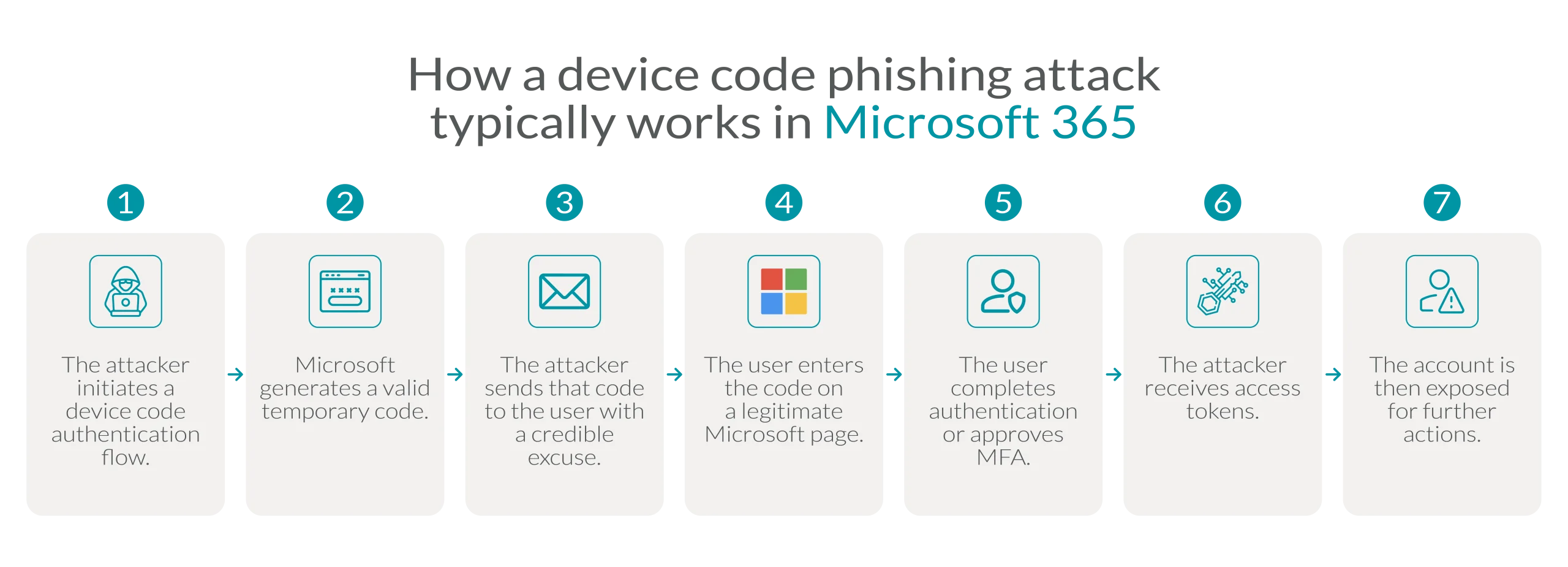
The strength of the attack lies in the fact that it doesn’t need to appear completely fake.
It can rely on support messages, supposed account validations, shared documents, invoices, internal processes, RFPs, or communications that appear urgent.
That’s why one thing should be clear in every organization:
A legitimate webpage doesn’t always mean the request is legitimate.
If the user did not initiate the authentication process, they should not enter a code or approve access.
Warning signs
Device code phishing may be complex behind the scenes, but its warning signs can be clearly explained.
A user should be suspicious if they receive:
- A request to enter a code they did not request.
- Instructions to “validate” or “recover” an account.
- Urgent messages related to access, documents, or invoices.
- Alleged requests from the support team.
- Links to genuine Microsoft pages, but in an unusual context.
- Requests to approve an authentication process they didn’t initiate.
- Communications via Microsoft Teams, email, SMS, or external platforms that pressure the user to act quickly.
Training shouldn’t be limited to detecting fake websites.
It should also teach users to recognize actions they didn’t initiate.
In identity security, context matters just as much as the screen the user is looking at.
What an IT team should review in Microsoft 365
Before implementing controls, it’s important to answer an architectural question:
Does the organization really need device code flow?
Not all tenants require it. And when there is a legitimate need, it should be documented, limited, and monitored.
An IT team should review:
- Whether there have been recent logins via device code flow.
- Which users, applications, or devices are using it.
- Whether there are Teams Rooms, shared devices, or technical tools that depend on this flow.
- Which privileged accounts might be exposed.
- What exceptions exist and who approved them.
- Whether Conditional Access policies are in reporting mode or active.
- Whether there are alerts for unexpected usage.
- Whether tokens, sessions, and consented applications are reviewed in the event of incidents.
This analysis enables a more secure decision: to block the flow, limit it, or allow it only in controlled scenarios.
Technical controls to reduce risk
Protection against device code phishing in Microsoft 365 should be addressed in layers.
1. Architecture decision
The first step is to determine whether the device code flow is necessary.
If there is no clear need for it, it should be blocked by default. If there are legitimate uses, they must be identified and assigned to a responsible party.
Keeping flows enabled “just in case” can increase exposure without providing operational value. Every flow allowed without monitoring, justification, or exception control expands the attack surface.
2. Conditional access: block by default, test first, and manage exceptions
Conditional Access is a key component in reducing the risk of device code phishing in Microsoft 365. However, this control must be applied judiciously.
Before blocking the device code flow, the IT team should review login logs in Microsoft Entra ID to identify whether there are legitimate uses within the organization. Some shared devices, meeting rooms, Teams equipment, or technical tools may rely on this flow. Therefore, the first step is not to block blindly, but to understand actual usage.
Next, the policy should initially be applied in reporting mode. This allows you to assess the impact, detect operational dependencies, and adjust the scope before enabling the actual block. Once this review is complete, the recommendation is to block the device code flow by default and allow only controlled exceptions.
These exceptions must be specific, justified, and reviewed periodically. Each should have a designated person in charge, a documented reason, a limited scope, and associated monitoring. A broad or permanent exception, without review, can become a new attack surface.
In summary: block when it is not necessary, allow only when justified, and always monitor. That is the balance between security and operational continuity.
3. Exception management
Exceptions may be necessary in some environments. However, they should not be broad, permanent, or difficult to audit.
A sound exception has a technical or business justification, an assigned owner, a defined scope, a review date, and specific monitoring.
In practical terms, an exception should not become a permanent, uncontrolled loophole.
4. Protection of critical identities
Privileged accounts, administrators, executives, finance departments, and users with access to sensitive data require stronger controls.
For these users, it is advisable to require phishing-resistant MFA, such as FIDO2, passkeys, certificates, or equivalent methods supported by the identity architecture.
Traditional MFA remains valuable, but some methods may be more vulnerable to social engineering, MFA fatigue, or attacks targeting tokens.
5. Detection and monitoring
Prevention isn’t enough without visibility.
The security team should monitor logins associated with device code flow, sessions resulting from this type of authentication, unusual locations, unexpected applications, and access from unmanaged devices.
It’s also important to review anomalous activity in Outlook, Teams, SharePoint, and OneDrive, especially when there are changes to email rules, mass downloads, or suspicious OAuth consents.
Early detection reduces exposure time.
6. Response to suspected compromise
If a compromise is suspected, the response should focus on identity, tokens, sessions, and data.
Priority actions include:
- Revoke active sessions.
- Invalidate refresh tokens.
- Change credentials if applicable.
- Review recent logins.
- Analyze activity in Outlook, Teams, SharePoint, and OneDrive.
- Verify suspicious email rules.
- Review authorized applications.
- Identify mass downloads or access attempts.
- Monitor subsequent activity.
- Document the incident and adjust policies.
The goal is not just to recover the account. It is to understand what the attacker might have done while they had access.
Why traditional MFA may not be enough
MFA reduces many risks. But it doesn’t eliminate them all.
In a device code phishing attack, a user may complete a valid authentication for a session they didn’t initiate. In that case, MFA is satisfied, but the access may benefit the attacker.
That’s why organizations must stop evaluating identity based solely on the question, “Do we have MFA?”
The assessment should be more thorough:
- Which MFA methods are allowed?
- Are they resistant to phishing?
- Which critical accounts are still using weaker methods?
- Is Conditional Access applied to authentication flows?
- Are tokens and sessions monitored?
- Is there a defined response to Microsoft 365 token theft?
Identity security does not depend on a single control. It depends on a coherent architecture.
How Wezen can help protect identities in Microsoft 365
In scenarios such as device code phishing, the question isn’t just which policy to enable.
The question is what level of exposure the organization currently faces.
When it comes to identity, the risk isn’t always due to a single misconfigured control. It often arises from a lack of visibility into how users authenticate, what exceptions exist, which applications have permissions, which sessions remain active, and which events trigger alerts.
Wezen can help companies review their identity and access posture in Microsoft 365 from a comprehensive perspective: Information Security, Infrastructure, Networking, Monitoring, and Reliable Operations.
This support can include evaluating Conditional Access policies, reviewing the use of device code flow, hardening Microsoft Entra ID, strengthening phishing-resistant MFA, monitoring authentication events, and responding to compromised accounts.
The goal is not to simply add isolated controls. It is to build a more secure, transparent identity architecture that is prepared to respond to real threats.
FAQ about device code phishing in Microsoft 365
Does device code phishing steal passwords?
Not necessarily. The attack can trick the user into authorizing a session initiated by the attacker.
Does MFA protect against device code phishing?
It helps, but it may not be enough if the user approves an authentication request they did not initiate.
Should the device code flow be blocked?
If the organization does not need it, blocking it by default reduces the attack surface. If it is needed, controlled exceptions should be implemented.
Which users are at the highest risk?
Privileged accounts, finance users, executives, IT teams, and profiles with access to sensitive information.
What should a company review first?
The actual use of the device code flow, Conditional Access policies, permitted MFA methods, and token/session activity.
Securing Microsoft 365 requires looking beyond passwords
Modern threats no longer target just passwords.
They also target sessions, tokens, permissions, and legitimate access that is misused.
Device code phishing in Microsoft 365 demonstrates why identity security must evolve. It’s not enough to enable MFA and assume the risk is mitigated. You need to review authentication flows, limit exceptions, strengthen phishing-resistant methods, monitor sessions, and respond quickly to signs of compromise.
Microsoft 365 can be a secure platform, but its actual level of protection depends on how it is configured, governed, and monitored.
Assess identity security in your Microsoft 365 environment and check whether your policies are prepared to prevent attacks that exploit legitimate authentication flows. Write to us.

Image: Generated by AI (DALL·E 3 – GPT-4o), OpenAI, 2026.
Sources
- Microsoft Security Blog. “Inside an AI-enabled device code phishing campaign”. Publicado el 6 de abril de 2026. URL
- Microsoft Learn. “Conditional Access: Authentication flows”. Actualizado el 24 de marzo de 2026. URL
- Microsoft Learn. “Microsoft-managed Conditional Access policies”. Actualizado el 25 de marzo de 2026. URL
- Microsoft Learn. “Restrict device code flow for Microsoft Teams devices with Conditional Access”. Actualizado el 28 de mayo de 2026. URL
- Microsoft Learn. “Require phishing-resistant multifactor authentication for administrators”. Actualizado el 24 de marzo de 2026. URL
- FBI / IC3. “Kali365 Phishing-as-a-Service Kit Hijacks Microsoft 365 Access Tokens”. Publicado el 21 de mayo de 2026. URL
Related articles

Security for SAP, why does Fortinet offer comprehensive protection in the cloud?
Find out what is the importance of ensuring security for SAP and six Fortinet use cases for SAP.
Hardening of Linux server to protect your IT infrastructure
Discover how hardening of Linux server strengthens IT security, reduces vulnerabilities and protects your organization's critical data from cyber threats.